
Best Practices for AI Feedback Loop Integration
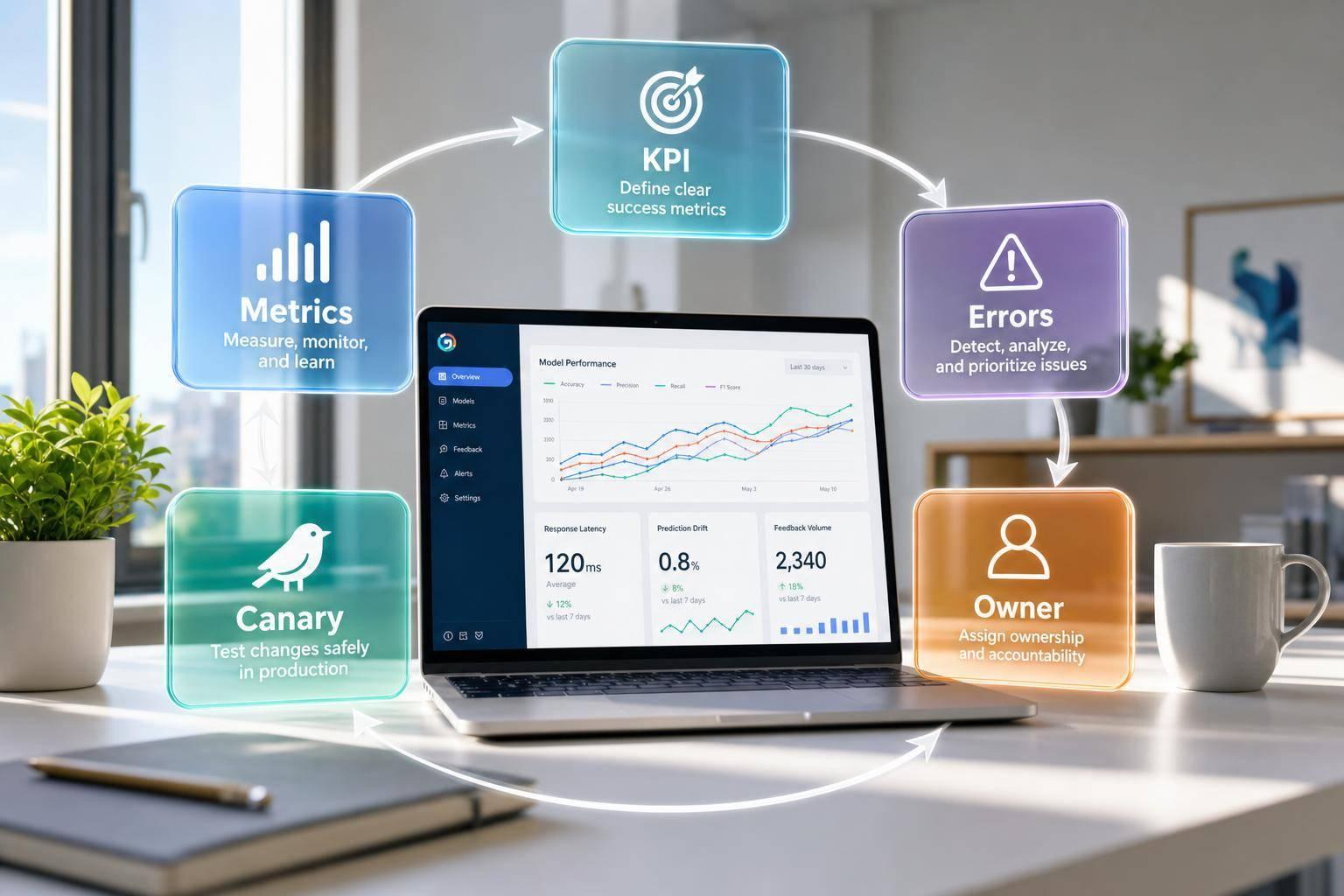
If your AI helpdesk has no feedback loop, it will repeat the same mistakes at scale. The fix is simple: I set clear KPIs, log every error in one format, turn repeat issues into small updates, and review results on a set schedule.
Here’s the short version:
- Start with goals first. I track 6–8 KPIs like containment rate, fallback rate, correction rate, repeat contact rate, and fix speed.
- Give each signal an owner. Agent edits, customer rephrasing, API errors, and escalation reasons should each go to one person or team.
- Escalate risky cases fast. Low-confidence replies, billing issues, legal risk, pricing mistakes, and direct requests for a human should route out right away.
- Keep feedback clean. I log channel, timestamp, conversation ID, prompt version, model version, retrieved docs, and error tags in one shared record.
- Fix the smallest thing first. Many issues need a prompt edit, knowledge-base change, or routing rule update, not retraining.
- Test before full rollout. A 10% canary for 72 hours helps check whether a change improves at least 4 of 5 core KPIs.
- Watch drift and safety. If fallback goes above 12%–15%, correction rate goes above 10%–15%, or CSAT drops by 0.3 points, I review it at once.
- Keep humans in the loop. Human review can improve decision accuracy by 31% and cut false positives by 67%.
Quick Comparison
| Area | What I focus on | What I do |
|---|---|---|
| Planning | Goals, KPIs, review cadence | Set thresholds and owners before scaling |
| Input | Customer, agent, and system signals | Store all feedback in one standard log |
| Fixes | Repeat failures | Use prompt, knowledge, routing, or retraining |
| Review | Performance and risk | Track by channel, team, and workflow |
In other words: the loop is the system. If I want AI support to stay accurate, lower support cost, and keep handoffs clean, I need feedback to move from signal → review → fix → measurement every week.
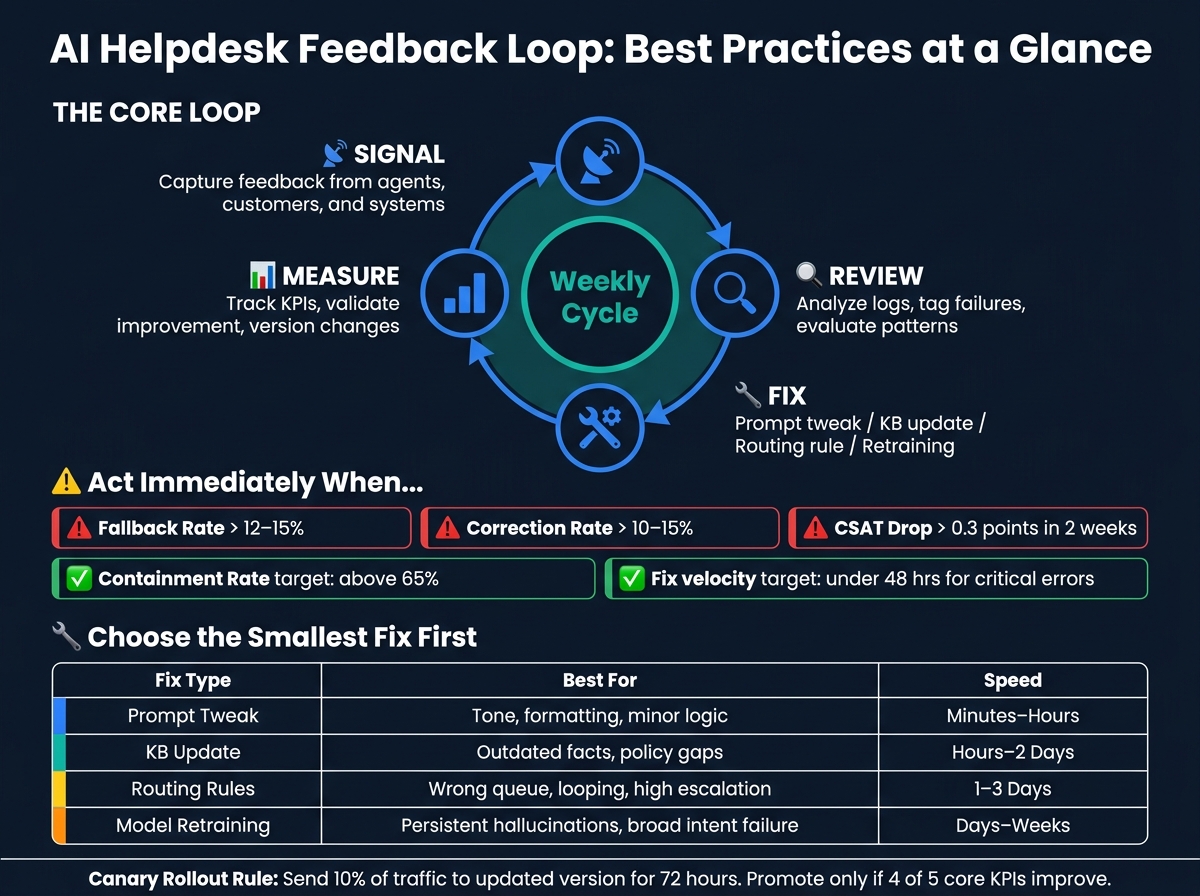
AI Feedback Loop: Signal → Review → Fix → Measure
AI Agent Evaluation Frameworks & Feedback Loops for Automated Improvement
sbb-itb-e1b05dc
Checklist 1: Design the Feedback Loop Before You Scale Automation
If you scale automation before building a feedback loop, you don’t just spread wins. You spread mistakes too.
Define goals, KPIs, and review cadence
Keep the dashboard tight. Track six to eight leading indicators, not a wall of numbers no one looks at. Before you scale, lock in these core KPIs:
| KPI | What It Measures | Action Threshold |
|---|---|---|
| Containment Rate | Conversations resolved without human handoff | Review if below 65% [4] |
| Fallback Rate | Proportion of inputs the AI cannot classify with confidence | Trigger review if above 12–15% [4] |
| Correction Rate | % of AI responses requiring human modification | High risk if above 10–15% [3] |
| Repeat Contact Rate | Users returning within 24 hours with the same query | Proxy for unresolved issues [4] |
| Feedback Loop Velocity | Time from error detection to deployed fix | Target under 48 hours for critical errors [3] |
Take baseline readings at 30, 60, and 90 days post-launch so reviews come from actual performance, not gut feel [4]. Then stick to a simple rhythm: a weekly log review, a bi-weekly improvement sprint, and a monthly stakeholder review [4].
Once those metrics are in place, every signal needs a clear owner. If no one owns it, it usually sits there.
Map feedback sources to actions and owners
Assign an owner to each feedback signal before launch:
| Feedback Signal | Use Case | Accountable Owner | Action Taken |
|---|---|---|---|
| Explicit correction | Direct failure identification | Agent Operations Lead | Triage for human review and labeling |
| Implicit rephrasing | Misunderstood intent | AI Trainer / Engineer | Refine intent recognition or prompt |
| API timeout / error | System reliability issues | Technical / DevOps Owner | Fix integration layer |
| Repeated failure | Systematic model errors | AI Engineer | Model fine-tuning or RAG updates |
| Policy conflict | Compliance or accuracy issues | Support Leader | Update system prompt or knowledge base |
Not all signals carry the same weight. Explicit corrections and escalation reasons should come first, especially compared with thumbs up/down data. Their signal-to-noise ratios are 9/10 and 8/10, respectively [7].
Use an impact × volume matrix to sort the backlog. That means:
- Fix high-volume, high-impact failures right away
- Watch low-volume edge cases on a rolling basis [4]
This is where many teams get stuck. They collect feedback, but nothing moves because ownership and escalation aren’t tied together.
Set escalation rules for low-confidence and high-risk cases
Next, define the moments when the AI should stop and hand the conversation off.
At a minimum, auto-escalate any conversation involving legal risk, billing error or monetary risk, sensitive personal information, or incorrect pricing [3]. Direct human-request phrases like "speak to a human", "supervisor", "real person," or "transfer me" should route right away [3][1].
For low-confidence cases, use confidence-based escalation so uncertain interactions go to a human review path [8].
There’s also a simple pattern to watch for: if the same error shows up 3–5 times in 24 hours, treat it as a process gap and fix it [3]. That’s not random noise. It’s a sign something in the system needs attention.
If you’re using Converso, seamless handoff keeps the full conversation context in place for human agents.
With escalation rules set, the next move is to standardize how feedback gets captured across channels.
Checklist 2: Capture and Organize Feedback in a Usable Format
After low-confidence and high-risk handoffs, put every conversation into one standard format. Every escalated or corrected conversation should end up in the same log.
Standardize feedback capture across webchat, WhatsApp, and SMS
Each record should include a unique conversation ID, user ID, channel (webchat, WhatsApp, or SMS), team or department, product area, and a timestamp in MM/DD/YYYY HH:MM AM/PM format [1][3][7]. If timestamps and channel labels aren't consistent, it's hard to compare performance across inboxes or spot patterns by team.
Log ratings, comments, rephrasing, abandonment, and copy/paste behavior in that same record [7][9]. Also log the prompt version, model version, retrieved documents, tools called, and response hash so failures can be reproduced. That gives you a clean way to trace what happened and assign the issue to the right person.
If you're using Converso, a shared omnichannel inbox can help keep conversation records in order across webchat and WhatsApp.
Use a simple tagging system for failures and content gaps
A fixed tag set turns raw logs into something your team can use. Stick to seven tags: incorrect answer, incomplete answer, tone issue, routing issue, policy violation, missing knowledge, and technical error [3]. That's enough to send issues to the right owner, whether that's the content team, AI trainer, or engineering.
One detail matters a lot here: explicit corrections, where an agent edits an AI response, carry the highest signal-to-noise ratio, while thumbs-up/down ratings are much noisier [7]. So don't use positive thumbs-up data for fine-tuning. It tracks engagement, not accuracy. Put your tagging and review time into thumbs-down ratings, agent edits, and escalation reasons.
Protect data quality and customer privacy
Not all feedback deserves action. Filter out comments from spam or abusive users, review and retire stale labels on a set schedule, and ignore minor edits that don't change meaning. Those aren't meaningful corrections [7].
On privacy, mask or remove all personally identifiable information (PII) before feedback enters any improvement dataset [1]. Keep live support logs separate from curated training data.
With feedback cleaned and tagged, the next step is to turn it into model, workflow, and knowledge-base updates.
Checklist 3: Turn Feedback Into AI, Workflow, and Knowledge Improvements
Review conversation samples and build an evaluation set
Start with the tagged logs from the previous checklist. The goal here is simple: separate random noise from failures that keep showing up.
Instead of skimming everything, zero in on four categories [4]:
- High-confidence failures: repeated errors your AI keeps making
- Low-confidence successes: cases that worked, but only barely
- Novel utterances: new phrasing or requests that point to a training backlog
- Problem sessions: conversations with rewording, abandonment, or repeated handoff requests
That filter helps you spend time where it counts.
From those examples, build a golden evaluation set with the original query, the AI output, and the expected output [3][5]. Think of this as your regression test set. When you make a change, you can check whether it fixed the problem without breaking something else.
One rule matters here: only move recurring failures into the evaluation set. A weird one-time edge case can distract the team and muddy the signal.
Set aside 90 minutes per week for this review process [4]. That small weekly habit keeps a steady pipeline of ranked tasks moving instead of letting problems pile up.
Choose the right improvement lever
Once you see the pattern, go for the smallest fix that solves it.
Not every issue needs retraining. In fact, most don’t. A tone miss might call for a prompt change. A bad answer tied to outdated info might point to the knowledge base. A messy escalation path might mean routing rules are off. Save retraining for failures that keep showing up across many cases.
Here’s the match-up:
| Improvement Lever | When to Use | Expected Impact | Time to Implement |
|---|---|---|---|
| Prompt Tweak | Tone issues, minor logic errors, formatting problems | High (for specific cases) | Minutes to hours |
| Knowledge Base Update | Factual gaps, outdated policy, repeated "how-to" failures | Medium to High | Hours to 1–2 days |
| Routing/Handoff Rules | High escalation rates, looping behavior, wrong-queue routing | High (efficiency) | 1–3 days |
| Model Retraining | Persistent hallucinations, broad intent misunderstanding | Very High (systemic) | Days to weeks |
When you ship a fix, don’t push it to everyone at once. Use a canary rollout instead: send 10% of traffic to the updated version for 72 hours [6]. Promote it only if it performs better on at least 4 of 5 core KPIs [6].
That way, your feedback loop stays tied to measured results, not gut calls.
Document changes and brief human agents
Treat every prompt and policy update like code. Version each change [2]. For every update, log what changed, why it changed, and which failure it was meant to fix. If something backfires, that record makes rollback much less painful.
Human agents should play a direct role here too. Use them to label failures and validate fixes [3]. Give them a simple Error-to-Improvement ticket template with fields for:
- original query ID
- error type, such as hallucination or tone mismatch
- expected behavior
This turns agent corrections into clean training data that the team can actually use [3].
A shared changelog plus short review sessions can keep agents in sync [3].
Checklist 4: Monitor Performance, Governance, and Long-Term Optimization
Track core metrics by channel, team, and workflow
Once fixes go live, the next job is simple: watch what happens after launch. You need to see whether those fixes stick across channels and workflows, not just in one neat-looking top-line report. A focused dashboard should track behavior, satisfaction, and ops signals by channel, team, workflow stage, and intent cluster. If you only look at aggregate numbers, it's easy to miss where things are starting to fail [4][2].
| Metric | Calculation | Review Frequency |
|---|---|---|
| AI Resolution Rate | (Conversations resolved without human handoff / Total AI interactions) × 100 | Weekly |
| CSAT (Customer Satisfaction) | Average score from post-interaction surveys (1–5 scale) | Weekly |
| Escalation Rate | (Total handoffs to human agents / Total AI interactions) × 100 | Weekly |
| Negative Feedback Rate | (Thumbs down + negative implicit signals / Total interactions) × 100 | Weekly |
| Repeat-Contact Rate | (Users returning within 24 hours for the same query / Total users) × 100 | Monthly |
| Fallback Rate | (Inputs failing confidence thresholds / Total user inputs) × 100 | Weekly |
| Correction Rate | (AI responses edited by humans / Total AI responses) × 100 | Monthly |
It also helps to set hard thresholds ahead of time so reviews don't drift into vague discussions. For example, a fallback rate above 15% for any intent cluster, or a CSAT drop of more than 0.3 points across a two-week rolling window, should trigger an immediate review [4].
One more thing: treat thumbs-up trends as a directional cue, not training data [7].
Audit for drift, safety or compliance risk, and broken handoff paths
If performance starts slipping, don't assume the model just had a bad week. Check for language drift, policy updates, or broken handoff paths. Language drift often shows up when fallback, rephrasing, or human-transfer requests start climbing inside one intent cluster [4].
You also need to watch for metric gaming. That's when the AI starts giving shorter, blurrier answers just to dodge negative feedback. On paper, thumbs-up rates may look steady. Meanwhile, CSAT drops because people aren't getting what they need [7].
For safety or compliance risk, put an evaluation gate in place that blocks any model update if hallucination rates or safety violations go up, even if total accuracy improves [7]. That rule matters. A model can look better in one report and still create a mess in billing, security, or policy-heavy cases.
Periodic stress tests help here too, especially around edge cases and sensitive topics like billing disputes, cancellation requests, and account security. Those are the moments where weak spots show up fast. It's also smart to apply a 45-day staleness cutoff to training labels. Feedback older than that can push the AI toward outdated pricing, policies, or product details [7].
These checks turn feedback into the next round of fixes.
Conclusion: A practical checklist for continuous AI helpdesk improvement
The four checklists in this article cover the full loop: define clear goals and review cadences before scaling, collect structured feedback across every channel, turn repeat issues into prompt changes and knowledge base updates, and monitor results with ownership and governance in place. Small fixes add up when every change is measured and versioned. For support teams, that kind of discipline is what lets you scale automation without losing accuracy, control, or customer trust [6].
Platforms like Converso support this cycle by combining AI-driven automation, structured knowledge retrieval, and seamless human handoff in a single system.
FAQs
How do I start a feedback loop with a small team?
Start at launch with simple feedback tools, like thumbs up/down, plus a shared place where team members can log examples of agent performance.
Put one person in charge of the process. Then run a recurring 30-minute monthly review to spot trends and the main failure modes.
The key is to group feedback into action-focused categories instead of reacting to every single incident.
When should I update prompts instead of retraining the model?
Update prompts when outside conditions change, like market shifts, catalog updates, or interface problems such as API timeouts.
Save retraining for lasting model changes, like fixing flawed inferences or adding new intent categories. Don’t treat retraining as the default fix. It costs more, and if your feedback loop is off, it can lock in bias instead of fixing the problem.
What signals matter most in an AI helpdesk feedback loop?
The most useful signals come from a mix of explicit feedback and implicit behavior.
Explicit feedback includes things like thumbs up/down or star ratings. That input is direct, but it usually shows up less often.
Implicit signals tend to appear more often, and they can show you where the AI is falling short. Key examples include:
- conversation abandonment
- repeated or rephrased questions
- escalation requests or human handoffs
- users completing tasks the AI should handle
- low confidence scores or frequent fallback responses



.svg)
.svg)
.svg)
.svg)