
GDPR-Compliant AI Agents: Best Practices
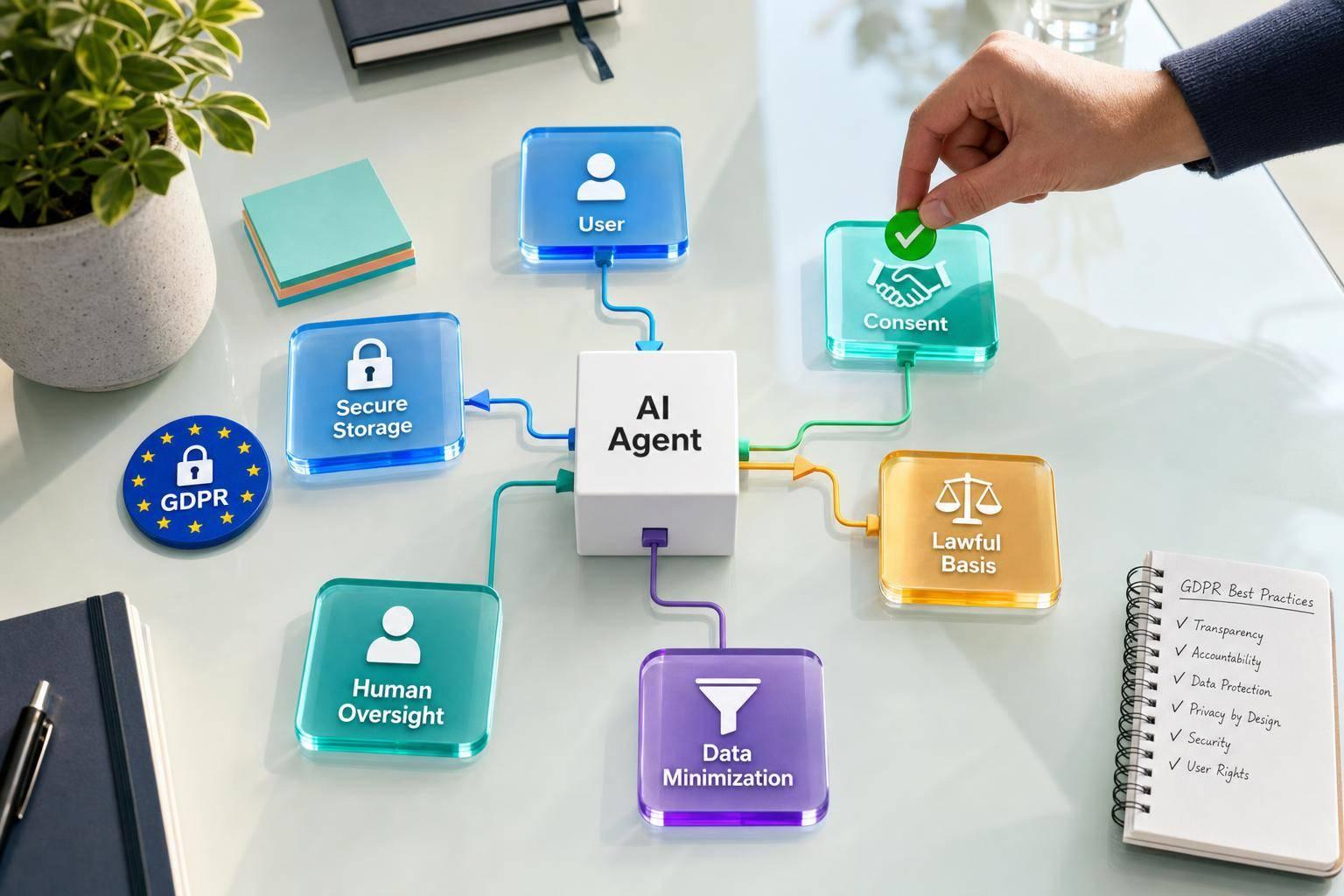
If your AI support agent handles messages from people in the EU or EEA, GDPR can apply even if your company is in the U.S. In plain terms, you need to know what personal data the agent touches, where that data goes, who can see it, why you process it, and when a human must step in.
Here’s the short version:
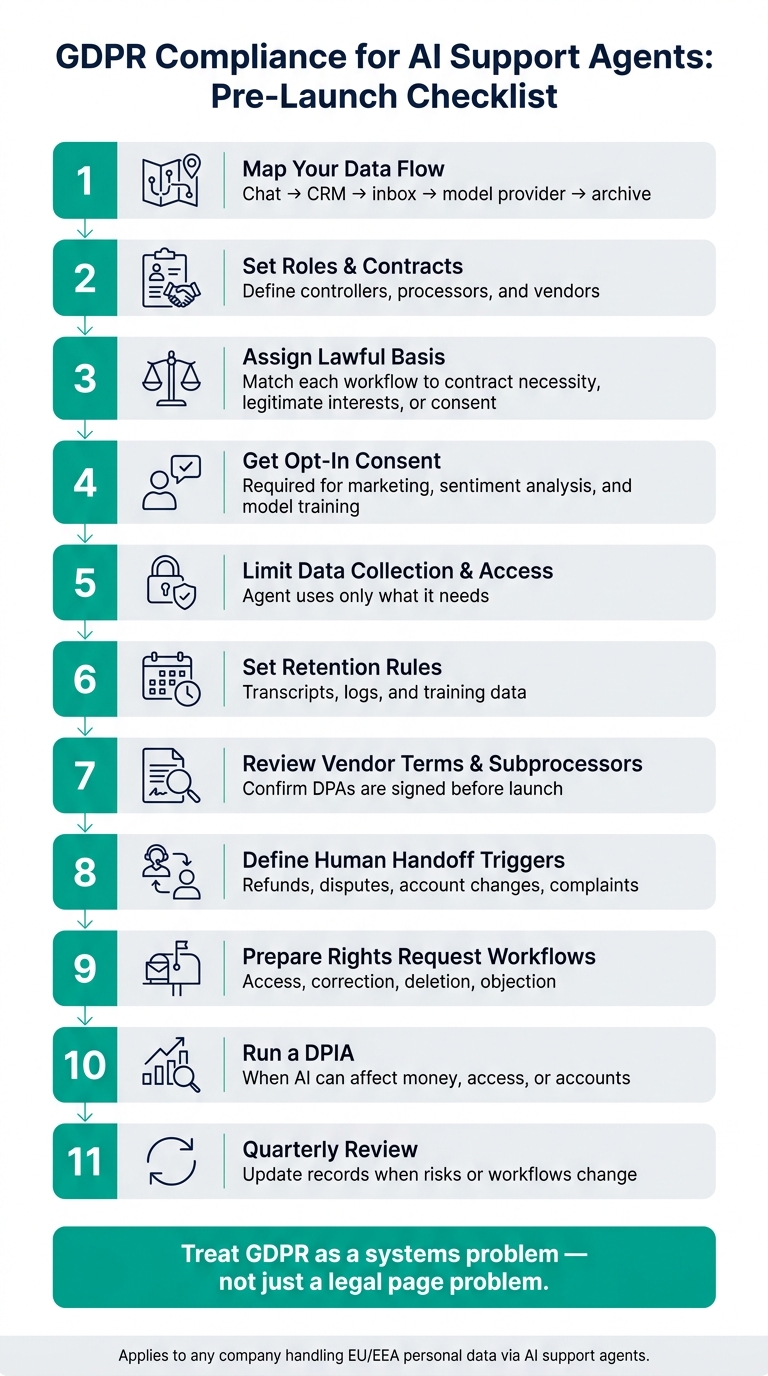
- Map your data flow from chat to archive, CRM, inbox, and model provider
- Set roles and contracts so controllers, processors, and vendors are clear
- Match each workflow to a lawful basis and explain AI use at the start of the chat
- Get opt-in consent for optional uses like marketing or model training
- Limit collection and access so the agent only uses the data and sources it needs
- Set retention rules for transcripts, logs, and training data
- Review vendor terms and subprocessors before launch
- Add human review for refunds, account changes, disputes, and complaints
- Prepare for rights requests like access, correction, deletion, and objection
- Run a DPIA when the agent can take actions that affect money, access, or accounts
- Review the setup every quarter and update records when risks change
A few facts make this more urgent. Customer support chats often collect names, emails, phone numbers, account IDs, billing details, and message history. And under GDPR, even one support workflow can trigger duties around notice, retention, access control, deletion, and vendor contracts.
What this article boils down to is simple: I’d treat GDPR for AI agents as a systems problem, not just a legal page problem. If the data flow, access rules, consent settings, and human handoff process are not set up before launch, the risk shows up later in audits, complaints, and rights requests.
This guide walks through the checks I’d put in place before launch and review after go-live.
GDPR Compliance Checklist for AI Support Agents
GDPR for AI Systems: Map Data Flows, Roles & Risk | Module 3.1
sbb-itb-e1b05dc
1. Confirm GDPR Scope, Roles, and Data Flows
Before you launch, check whether the agent handles personal data from people in the EU or EEA. Start with the data the agent touches. Then follow where that data goes, where it sits, and which parties handle it.
Inventory the Personal Data Your Agent Handles
Support chats often collect more personal data than teams first assume. Names, email addresses, and phone numbers are common. But free-text messages can also reveal account IDs, billing details, product usage context, and device identifiers pulled from cookies or other technical metadata.
If your agent can process files or media, the scope gets broader. File uploads, images, videos, and location sharing can all pull in more data types. Even knowledge base files like PDFs and Word documents may contain personal data by accident. Audit every source the agent can read from or write to, not just the live chat feed.
| Data Category | Examples |
|---|---|
| Identity & Contact | Name, email address, phone number, account ID |
| Communication | Chat transcripts, free-text queries, internal agent notes |
| Technical Metadata | Device identifiers, cookies, message timestamps |
| Media & Files | PDFs, images, videos, location data (WhatsApp), uploaded documents |
| Financial / CRM | Billing details, payment status, subscription plan, usage data |
Once you know the data types in play, map each system that stores, processes, or forwards them.
Map Every Transfer, Storage Location, and Subprocessor
Support data rarely stays in one place. One customer conversation might pass through a chat widget, an AI inference layer, a shared inbox, a CRM sync, and a transcript archive. Each step may involve a different system or vendor.
Write that path out clearly. Note every third party that touches the data. That includes the AI model provider handling the message, any billing or CRM tool connected by API or webhook, and the archive where transcripts are stored. Store transcripts in a secure, access-controlled repository with audit logs. If your setup also sends data to tools like Stripe, Xero, or QuickBooks, list those integrations as subprocessors too [1][4].
With the full flow mapped, set controller and processor duties before launch.
Define Controller and Processor Responsibilities
In most cases, your company is the controller. The helpdesk platform, model provider, and analytics tools usually act as processors or subprocessors.
That split affects contracts and day-to-day handling. You need a Data Processing Agreement (DPA) with each vendor that processes EU/EEA personal data on your behalf. Internal human agents who receive AI handoffs work under your internal access policy, so their access should be limited through role-based controls tied to the conversations they can view.
Get these responsibilities mapped and written down before launch.
2. Document Lawful Basis, Transparency, and Consent
After you’ve mapped data flows and roles, the next step is simple: give each AI support workflow a clear lawful basis for processing personal data. Then make sure users know what’s going on from the first message they see.
Assign a Lawful Basis to Each Support Workflow
Not every support interaction falls under the same GDPR lawful basis.
Contract necessity usually covers core support tasks like billing questions, account help, and onboarding guidance. Legitimate interests often fits ticket routing, troubleshooting, and limited service improvement work like trend analysis, as long as those interests are weighed against the user’s privacy rights. Consent is required for anything optional, such as marketing follow-ups or sentiment analysis used for non-core purposes.
| AI Support Workflow | Lawful Basis |
|---|---|
| Account & Billing Help | Contract Necessity |
| Ticket Routing | Legitimate Interests |
| Trend Analysis & Troubleshooting | Legitimate Interests |
| Marketing Follow-ups | Consent |
| AI Model Improvement Using Transcripts | Consent |
| Lead Generation | Consent |
List the lawful basis in your Privacy Policy and restate it briefly in in-chat notices [3].
Once each workflow has a lawful basis, spell it out at the start of every chat.
Disclose AI Processing at the Start of Each Conversation
Users need to know right away that they’re talking to an AI agent, not a human [1]. That notice should appear automatically at the start of each session, in plain English, with no legal maze.
The opening message should explain:
- that the user is chatting with AI
- why the data is being processed
- what types of personal data are being handled
- how long the data will be kept
- where to find the full privacy notice [3]
If the agent can hand the conversation off to a human, say that too. And if message history will be passed along so the human agent has context, make that clear upfront [1][4].
Keep the notice short. A brief summary plus a "Read More" link to the full privacy policy is enough.
For any optional processing, users should get a clear choice before their data is used.
Add Consent and Preference Controls Where Needed
If processing goes beyond core support, you need explicit opt-in controls. That includes sentiment analysis, marketing follow-ups, and using transcript data to train AI models. Put those controls where people can actually use them: inside the chat interface, in account settings, or right when the optional feature first appears [3][1]. Don’t hide them in a terms page.
Consent settings should work like live switches, not one-and-done notices. If a user withdraws consent, that update should sync automatically. If your agent connects to a CRM through an API or webhook, the opt-out should show up right away across downstream systems [1].
A central repository also makes withdrawal requests, deletion, and audit trails much easier to handle [1].
Next, limit what the agent collects, set retention rules, and lock down transfers.
3. Minimize Data and Set Retention, Transfer, and Security Controls
Limit What the Agent Collects and Shares
Once lawful basis and transparency are in place, the next step is simple: cut down the data the agent touches. Use your data-flow map to remove fields that aren't needed. Prompts and intake forms should ask only for the information required to solve the issue. If the agent doesn't need it to help the customer, don't collect it.
Just as important, keep the agent tied to approved sources only. That means knowledge base articles, assigned docs, and official pages.
Knowledge scoping adds another layer here. In Converso, each AI agent works inside a defined workspace and can only use the files, URLs, and FAQs assigned to it [2]. Review active sources on a regular basis, and turn off anything outdated or packed with sensitive internal detail [2].
Set Retention Rules for Transcripts, Logs, and Training Data
Set a written retention window for each type of data: conversation transcripts, audit logs, and fine-tuning data. Without written rules, data tends to pile up and sit there far longer than planned. That's where compliance trouble starts.
There’s always a tradeoff:
- Short retention: less exposure, easier deletion, and closer alignment with storage limitation
- Long retention: more context for disputes and quality checks, but more risk, so you need a clear reason, tighter access controls, and firm deletion rules
Whatever timeline you pick, write down the reason for it and apply it the same way across each data type [2].
Verify Transfer Safeguards and Security Baselines
After retention is set, tighten up transfers and access. Before customer support data goes to third-party services, review the privacy policies of each provider and audit subprocessors to confirm they do not have unauthorized access to personal data [3]. If you're connecting third-party platforms, require MFA on those connections [4].
Use separate workspaces and granular access controls so only specific team members can view certain customer conversations [1]. That kind of workspace isolation supports least-privilege access and makes it easier to separate products, departments, or customer groups when different privacy rules apply [1].
Next, review vendor terms, subprocessors, and human handoff rules.
4. Set Up Vendor Controls and Human Oversight
Once data handling and retention are in place, the next step is to lock down your vendors and spell out when a human needs to step in. This is where a lot of teams get sloppy. They set up the tool, test a few prompts, and move on. But if the vendor terms are fuzzy or the escalation rules are vague, that can come back to bite you.
Review DPAs, Subprocessors, and Model Data Use
Use your mapped support workflow to check every processor, subprocessor, and model-use term tied to the system. Go through each vendor in your data flow and confirm three things:
- A signed DPA is in place
- The subprocessor list is current
- The terms clearly state how model training works
If even one of those is missing, stop the launch.
You also need to confirm whether customer support data is used to train the provider’s general AI models. Don’t rely on a sales call or a help center summary. Check the vendor’s terms yourself and verify that the data is limited to your account only.
After the vendor review is done, set clear rules for which cases must go to a human.
Define When AI Should Hand Off to a Human Agent
Some issues should never stay fully automated. Payment disputes, legal complaints, and account-access issues should go straight to a human so someone can review the situation with care and context.
Write those triggers down before launch. Then make sure the handoff includes the full picture:
- Full message history
- Customer metadata
- AI reasoning context
That way, the human agent isn’t dropped into the middle of the case blind.
If the agent can trigger actions, the handoff also needs a mandatory approval step. No shortcuts here.
Check for Article 22 and Other High-Risk Automation Triggers
Things get more serious once an AI agent can trigger refunds, account changes, or other actions that affect a customer’s rights, money, or access. At that point, the workflow needs a close Article 22 review.
Article 22 of the GDPR restricts solely automated decisions that produce legal or similarly significant effects on individuals. If your AI can complete a refund or change a customer’s access without human approval, document a mandatory human approval step and make sure a person can intervene, override, or be notified before the action completes.
A simple audit question helps here:
could this action affect a customer's account, money, or access?
If the answer is yes, add a human checkpoint and document it as part of your compliance evidence.
5. Handle Rights Requests, DPIAs, and Regular Reviews
After launch, use that same data map for rights requests and regular review.
Build Workflows for Access, Deletion, Correction, and Objection
Once your AI agent is live, you need a clear process for data subject rights requests: access, correction, deletion, restriction, portability, and objection. Use the central archive and shared inbox to pull up conversational data across every channel.
Before you release, correct, or delete any data, verify the requester’s identity with a verified identity check. For correction and deletion requests, make sure the update flows through every connected system, including CRMs, help desks, warehouses, and any APIs or webhooks. If one system is missed, the record won’t match everywhere, and that’s where problems start.
Some requests need a person in the loop. Complex requests or objections should go to a human reviewer with the full thread so they can see the context and make the call with all the facts in front of them.
Keep access to the conversations tied to the request limited to defined staff members. Then log both receipt and completion in the archive so you have a clear audit trail.
That same archive and those same access controls also help with risk reviews and audits.
Run a DPIA When Risk Thresholds Are Reached
Run a DPIA when agentic workflows can trigger back-office actions such as issuing refunds, fetching plan details, or booking appointments —especially when using OpenAI Assistants on your website [1].
If a DPIA is needed, document the risks you find and the steps you put in place to reduce them, such as access controls, retention limits, and human approval steps. If your system uses corrected answers, log the original AI answer, the corrected version, and the reason for the correction. Those records can serve as documented human oversight [2].
Conclusion: Key GDPR Checks to Run Before and After Launch
Review quarterly. GDPR compliance doesn’t stop at launch. Use the quarterly review to check your archive, retention, vendor, access, and rights-request controls. Update knowledge sources when the business changes so the agent doesn’t rely on stale information.
| Checkpoint | Pre-Launch | Post-Launch (Quarterly) |
|---|---|---|
| Centralize and archive conversations in a central repository | ✓ | ✓ |
| Build search workflows for access requests across channels | ✓ | ✓ |
| Verify deletion and correction syncs to connected systems | ✓ | ✓ |
| Restrict conversation visibility to defined staff members | ✓ | ✓ |
| Review vendor terms, subprocessors, and model data use | ✓ | ✓ |
| Log human oversight and corrected answers | ✓ | ✓ |
| Test rights request handoff and fulfillment end to end | ✓ | ✓ |
| Run or update a DPIA when risk changes or high-risk automation is introduced | ✓ | On change |
The goal is a repeatable process that stands up to requests, reviews, and regulatory scrutiny.
FAQs
Does GDPR apply if my company is based in the U.S.?
Yes. GDPR can apply to U.S.-based companies if they process the personal data of people in the EU.
Here's the plain-English version: if your business offers goods or services to people in the EU, or tracks how they behave, GDPR may apply to you.
For SaaS support teams, that usually means putting a few key practices in place:
- Data minimization: collect and store only the data you need
- Clear privacy policies: explain what you collect and how you use it
- Consent management: get and track permission when it's required
- Secure data archiving: store records safely and control access
- Handling deletion requests: delete personal data when users ask and when the law calls for it
That may sound like a lot at first. But the core idea is pretty simple: if you're dealing with EU user data, you need to treat it with care and have a clean process around how it's collected, stored, and removed.
When does an AI support workflow need human approval?
An AI support workflow should route cases to a person when the agent goes beyond its set limits or can't hit the required confidence threshold for a query.
A human should also step in for complex requests or when the detected intent calls for human judgment. That way, repetitive tier-1 work stays automated, while sensitive or high-value conversations remain under human oversight.
Do I need consent to use chat transcripts for AI training?
Yes - if you plan to use chat transcripts for AI training, you should get clear, explicit opt-in consent, keep a record of that consent, and make opt-out simple.
Converso’s GDPR approach includes consent management for the widget, along with options to redact or turn off chat logs and handle retention or deletion requests.


.svg)
.svg)
.svg)
.svg)