
Break-even Analysis for AI: SaaS Guide

If I can’t show when AI support pays back its cost, I don’t have a budget case yet. This guide comes down to a few numbers: my current cost per ticket, AI setup cost, AI cost per conversation, eligible ticket share, containment rate, and monthly savings. From there, I can work out payback period, break-even ticket volume, and whether AI support saves money at my current load.
Here’s the short version:
- I start with my human-only support cost per ticket
- I split AI costs into one-time setup and monthly usage
- I estimate savings from:
- contained tickets
- lower handle time on escalations
- avoided hiring
- I calculate:
- monthly savings
- break-even contained tickets
- break-even total volume
- payback in months
- I test weak and strong cases, like 30%, 50%, and 70% containment
A simple example from the article makes the math clear: if AI costs $500/month and saves $5.00 per contained ticket, I need 100 contained tickets per month to break even on that monthly spend. If setup cost is added, I also need to check how many months of savings it takes to recover that upfront amount.
I’d also avoid judging the project on finance alone. A model can look good on paper and still fail if answers are wrong, handoffs are messy, or the knowledge base is out of date. So I’d read the result in two parts: does it pay back, and does it still protect support quality?
The article also shows how to model this for Converso by looking at three support paths: AI-only, AI-assisted escalation, and fully human-handled. That makes it easier to see where savings come from across web chat, WhatsApp, workspaces, and ticket types.
The AI ROI Problem: Why Individual Productivity Gains Don't Automatically Create Business Value
sbb-itb-e1b05dc
The cost model behind AI support break-even
Build two separate models: one for your current human support cost and one for your AI-enabled support cost. If you skip either one, you're not modeling anything - you’re guessing. And for the comparison to mean anything, both models need to use the same ticket volume.
Baseline human support costs: labor, tooling, and cost per ticket
The baseline model starts with four inputs:
- Monthly ticket volume
- Average handle time (AHT)
- Agent headcount
- Fully loaded cost per agent
“Fully loaded” means more than salary. It also includes benefits, payroll taxes, management overhead, and training time.
Then add your helpdesk software and other support tools. Once you have total monthly support cost, divide it by monthly tickets resolved. That gives you your human-only cost per ticket.
AI support costs: fixed setup costs and variable interaction costs
AI support costs fall into two buckets: fixed and variable.
Fixed costs happen up front: environment setup, knowledge mapping, and one-time integration. Variable costs show up every month: LLM usage, knowledge lookup, and ongoing knowledge updates.
Here’s the simple way to think about it: fixed costs shape payback, while variable costs shape per-ticket economics. Together, they feed your payback period and your per-ticket break-even point.
| Cost Category | Type | What It Covers |
|---|---|---|
| Environment setup | Fixed | Initial installation and environment configuration |
| Knowledge mapping | Fixed | Structuring documentation, codebases, PDFs, and media into a queryable knowledge base |
| Integration work | Fixed | One-time deployment and integration |
| LLM usage | Variable | Per-token or per-conversation charges for processing user inquiries |
| Knowledge lookup | Variable | Searching for relevant excerpts to ground responses |
| Knowledge updates | Variable | Re-extracting changed files and updating the knowledge base |
Where savings come from: containment, shorter handle time, and hiring avoidance
There are three main savings drivers: containment, lower handle time on escalated tickets, and avoided hiring.
Containment means the AI resolves a ticket from start to finish. Each contained ticket removes the human cost of handling that interaction.
Reduced handle time on escalated tickets is the next lever. When AI passes along context, agents spend less time reading history or asking for missing details. That lowers AHT even when the ticket still needs a person.
Hiring avoidance is the third piece. As ticket volume climbs, a human-only team usually needs more headcount. An AI-enabled team can take on a decent share of that growth without adding agents right away. To price that out, use your fully loaded cost per agent.
Next, turn those inputs into baseline cost, AI cost, monthly savings, and break-even time.
How to calculate break-even for an AI-powered helpdesk
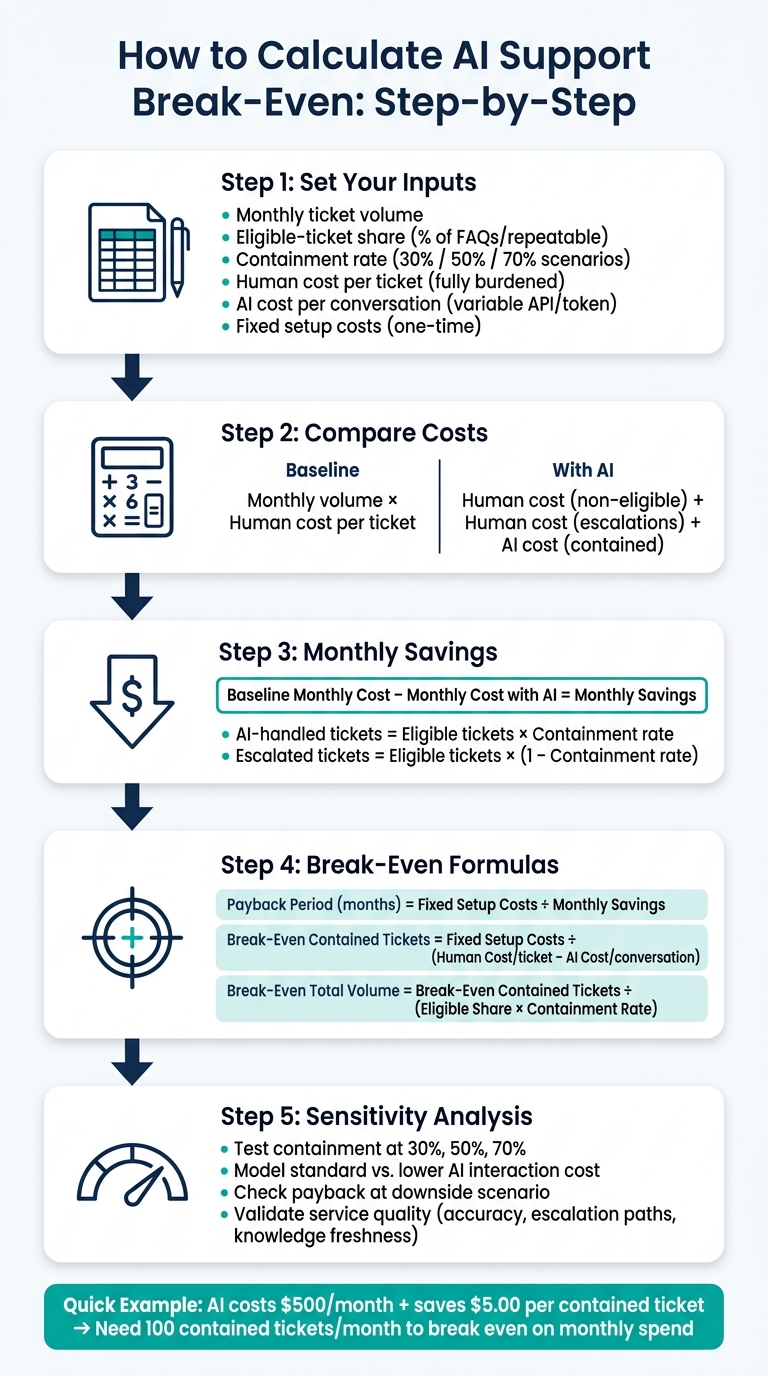
AI Support Break-Even Analysis: 5-Step Calculation Framework
Step 1: Define the core variables and assumptions
Start by turning your assumptions into a simple spreadsheet model.
| Input Category | Spreadsheet Variable | What to Enter |
|---|---|---|
| Volume | Monthly interactions | Total support tickets received per month |
| Volume | Eligible-ticket share | Share of tickets that are FAQs, password resets, or other repeatable inquiries |
| Performance | Containment rate | % of eligible tickets the AI resolves without human intervention |
| Human costs | Human cost per ticket | Fully burdened labor and tooling cost per human-resolved ticket |
| AI costs | AI cost per conversation | Variable API/token cost per AI-processed conversation |
| Investment | Fixed setup costs | One-time implementation, training, and software licensing costs |
A good way to pressure-test the model is to run a few containment cases side by side. Use 30%, 50%, and 70% so you can see how the numbers change when performance shifts.
Step 2: Calculate baseline cost, monthly cost with AI, and monthly savings
Next, compare your current support cost with the cost after AI is added.
| Calculation | Formula |
|---|---|
| Baseline monthly cost | Monthly interactions × Human cost per ticket |
| Monthly cost with AI | Human cost for non-eligible tickets + human cost for escalations + AI cost for contained tickets |
| Monthly savings | Baseline monthly cost − Monthly cost with AI |
Here’s how the ticket flow works:
- Eligible tickets = Monthly interactions × Eligible-ticket share
- AI-handled tickets = Eligible tickets × Containment rate
- Escalated tickets = Eligible tickets × (1 − Containment rate)
Once you have monthly savings, the payback math gets pretty straightforward.
Step 3: Calculate break-even volume and break-even time
Use these formulas to figure out when the setup cost pays for itself:
Payback period (months) = Fixed setup costs ÷ Monthly savings
Break-even contained tickets = Fixed setup costs ÷ (Human cost per ticket − AI cost per conversation)
Break-even total monthly volume = Break-even contained tickets ÷ (Eligible-ticket share × Containment rate)
If your contained ticket volume stays below that threshold, the project won’t break even.
Applying the model to AI-native helpdesk operations with Converso
How Converso changes the inputs in a break-even model
Converso changes three break-even inputs: containment rate, escalation cost, and channel mix. The key point is simple: it moves all three at the same time.
Containment rate is the biggest lever. Converso deploys AI agents to handle first-line SaaS questions automatically across web chat and WhatsApp. Scoped, structured knowledge keeps replies tied to the right workspace. That helps more questions get resolved without needing a human. From there, you can recalculate monthly savings and payback based on the new containment rate.
Escalation cost is the second lever. When a conversation does need a human, Converso passes over the conversation history, customer metadata, and reasoning context in a single handoff. That keeps the thread intact and cuts the cost of escalated cases.
Channel mix is the third lever. Multi-channel deployment expands the set of conversations AI can handle, which increases the share of tickets moving through lower-cost paths.
Put together, these features change monthly savings in two main ways: they push containment up and reduce the effort tied to escalations.
Modeling support costs by workspace, channel, and escalation flow
A single blended cost-per-ticket number can make things look simpler than they are. In practice, support costs often vary a lot by workspace, channel, and handoff path. Converso's workspace and inbox structure lets you model those differences directly.
| Cost Path | Description | Cost Driver |
|---|---|---|
| AI-only | AI resolves the inquiry without human involvement | AI interaction cost |
| AI-assisted escalation | AI handles first contact, then hands off with full context | AI interaction cost plus reduced human handling effort |
| Fully human-handled | Ticket type is outside AI scope from the start | Full human cost per ticket |
You can run this breakdown for each workspace on its own. Different products, customer segments, or channels may have different containment and escalation patterns. If you roll everything up into one model, you get a blended monthly savings figure. If you keep each part separate, you can see which workspace, channel, or segment is most likely to hit break-even first.
Metrics table: before Converso vs. with Converso
Use this table to compare your current support setup with Converso-enabled workflows. Swap in your own figures so the model reflects your team, your channels, and your ticket flow.
| Metric | Before Converso | With Converso | What Drives the Change |
|---|---|---|---|
| Containment rate | Low or zero for AI-handled inquiries | Higher on eligible first-line inquiries | AI agents resolve routine questions automatically across web chat and WhatsApp |
| Escalation percentage | Most or all inquiries require human involvement | Lower for eligible conversations | When confidence is low or escalation is needed, handoffs are triggered |
| Agent handle time per escalation | Full resolution time | Lower because context is preserved | In-context handoff passes conversation history, customer metadata, and reasoning context |
| Channel mix | Heavier reliance on human-handled channels | More volume served through AI-enabled channels | Multi-channel deployment raises the share of conversations AI can contain |
| Labor savings and hiring avoidance | More human capacity needed as volume grows | Lower human ticket volume and less pressure to add headcount | AI absorbs routine support work and reduces escalation volume |
Plug these inputs into the break-even model, then test how payback changes by workspace and channel. It also helps to run the same inputs through best-case and worst-case assumptions before you commit budget.
How to read results and make a sound investment decision
Run sensitivity analysis before committing budget
Use the break-even result as your base case. Then pressure-test it with downside and upside scenarios. The goal is simple: see how fast the economics fall apart when your assumptions get weaker.
Start with containment rate and AI interaction cost.
For containment, test 45% and 76%. If the payback period still looks reasonable at the low end, your case gets a lot stronger. If the math only works at the high end, then the downside case is weaker than the base case makes it seem.
For AI interaction cost, model both a standard case and a lower-cost case. Some specialized extraction models can cut the volume of content sent to LLMs by up to 90% [2]. That can lower your variable cost per interaction by a lot. It also gives you more room if usage climbs.
Financial break-even matters. But it doesn't tell the whole story. Service quality decides whether the model keeps working once customers start using it.
Balance financial break-even with service quality and risk
Payback alone won't show service quality risk. Support leaders also need to look at what happens to the customer experience when AI answer quality varies or when escalations go sideways.
Here are the main gains, risks, and tradeoffs to review next to your financial model:
| Factor | Gain | Risk / Tradeoff |
|---|---|---|
| Response speed | Faster first response on routine inquiries | Speed has no value if answers are inaccurate |
| Answer consistency | Structured knowledge reduces variation | Poor scope increases off-topic answers |
| Human oversight | Escalation paths keep humans in the loop | Weak escalation rules can let low-confidence answers slip through |
| Knowledge quality | Accurate retrieval improves containment rate | Outdated knowledge lowers containment and accuracy |
| Customer experience | Faster resolution on common questions | Complex or sensitive issues still require a human agent |
One practical check helps here. Confirm whether the AI system you're reviewing uses confidence tags to separate answers pulled directly from your knowledge base from answers that were inferred [1]. That split matters. It helps human agents review escalated conversations, and it makes quality problems easier to catch early.
Conclusion: The key numbers every SaaS team should leave with
If the model holds up under both financial checks and service-quality checks, the case for investment is stronger.
A sound AI helpdesk decision comes down to five steps:
- Establish your baseline cost per ticket
- Model fixed and variable costs
- Test realistic containment
- Calculate break-even volume and payback
- Stress-test your assumptions
Break-even analysis shows whether the investment works and which assumptions need to stay in place.
FAQs
What’s a good starting containment rate to assume?
A 40% containment rate is a solid starting point for break-even projections. If you want to model the low end, use around 20%. If you're aiming high, 70% can work as a stretch target.
In practice, many SaaS teams end up automating 60% or more of tier-1 tickets. For early planning, a 40%–60% range is a realistic place to start as your AI agent gets better over time.
How do I estimate savings if AI only reduces handle time?
First, figure out your current human-agent cost per minute: take the total average salary plus overhead per hour, then divide by 60. After that, multiply that number by the minutes saved per ticket across your monthly support volume.
AI can cut time spent on documentation and repetitive inquiries by up to 90%, which can lower operating costs while maintaining service quality.
When does AI save money at low ticket volumes?
AI can cut costs when ticket volume is still low, mainly by reducing the need to add more headcount. That matters most for after-hours support, where teams often need extra coverage, and for repetitive tier-one questions that can pull human agents away from harder work.
It also gives teams 24/7 availability and instant replies. On top of that, it can automate routine documentation lookups and onboarding guidance, which helps teams handle basic spikes in demand or off-hours service without hiring more staff.


.svg)
.svg)
.svg)
.svg)