
Error-Free Support: AI's Role in Cost Avoidance
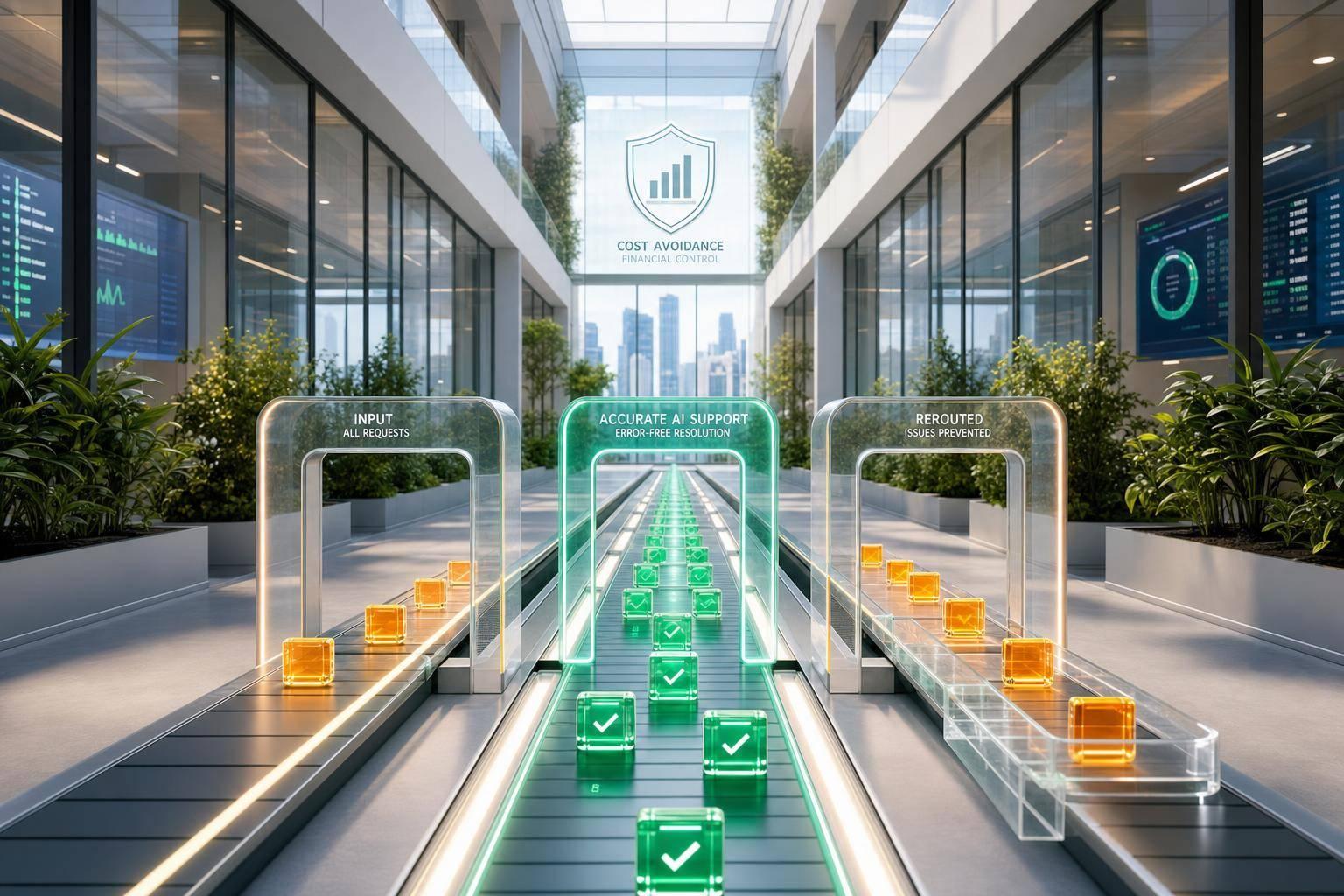
One wrong support reply can cost far more than the original ticket. If a standard support contact costs about $20–$25, a bad response can trigger refunds, repeat tickets, escalations, churn, and manual cleanup that costs much more over time.
Here’s the short version: I’d look at AI in support not just as a way to lower ticket costs, but as a way to stop avoidable costs before they happen. In this article, that means using AI to cut errors tied to billing, setup help, policy answers, and missed handoffs to human agents.
The main idea is simple:
- Cost savings = spending less now
- Cost avoidance = stopping future spend, like a $150 refund, an SLA miss, or a canceled account
- The biggest support losses often come from:
- wrong billing guidance
- stale policy replies
- bad setup instructions
- missed escalation steps
- AI helps when it:
- answers from approved docs
- stays inside set knowledge limits
- hands off risky cases to humans
- keeps conversation context across channels
- The numbers that matter most are:
- AI containment rate
- accuracy
- first-contact resolution
- escalation rate
- cost per resolved ticket
- CSAT delta
A few stats stand out. Recovery from AI error spread can hit about $3,400 in labor for 200 bad ticket classifications. Tier 2 and specialist work can cost 1.5x to 2.5x more than Tier 1. And if 500 billing disputes per month each create $20 in rework, that’s $120,000 per year in avoidable spend before churn is even counted.
What I take from the article is this: error reduction is a finance issue, not just a support metric. If AI gives grounded answers, uses confidence-based handoff, and stays away from high-risk topics unless a human steps in, it can help cut rework, refunds, and lost ARR without forcing the team to grow headcount at the same pace.
That’s the lens for the rest of the piece: measure the cost of support mistakes first, then judge AI by how much waste it helps you prevent.
The Real Cost of Support Errors
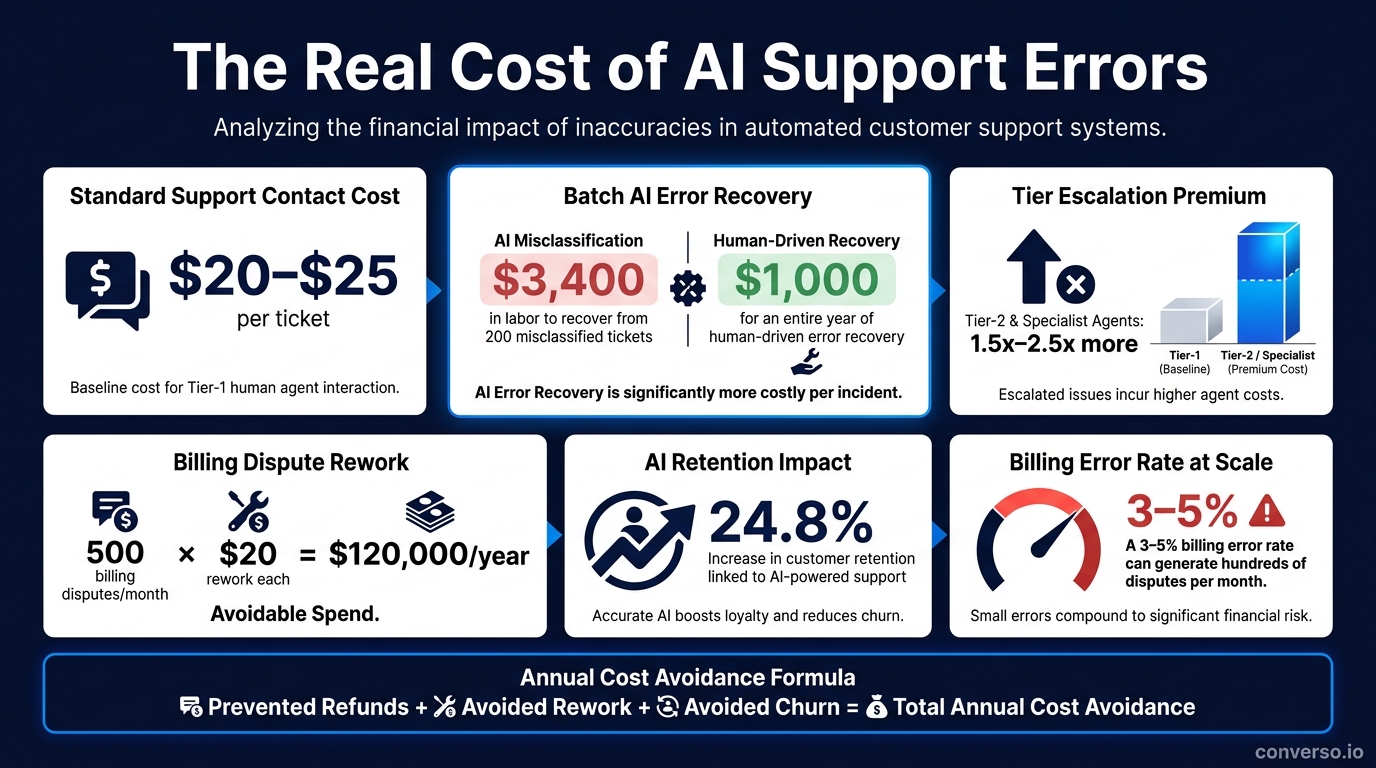
The Real Cost of AI Support Errors: Key Numbers at a Glance
Direct Costs: Extra Tickets, Rework, Refunds, and Longer Handle Time
One wrong answer doesn’t just create one problem. It often leads to follow-up contacts, escalations, and extra rework. So a $20–$25 support interaction can snowball into more contacts, manual fixes, and refunds.
Labor costs climb fast too. Tier-2 and specialist agents cost 1.5x to 2.5x more than Tier-1 [8], which means every inaccurate first reply pushes costs up right away. And when billing errors show up, the damage spreads even more. In a high-volume setting, a 3–5% billing error rate can lead to hundreds of disputes each month, with each one needing manual correction [1].
That’s only the first hit.
The larger issue is scale. A human mistake is usually contained to one case. An AI mistake can spread across many conversations before anyone catches it. Recovering from one batch error of 200 misclassified tickets costs about $3,400 in labor, compared with about $1,000 for an entire year of human-driven error recovery [3].
That’s why reducing errors should be tracked as a financial control, not just a support KPI.
Indirect Costs: Churn, Lost ARR, and Wasted Acquisition Spend
Labor is only part of the picture. When customers run into repeated wrong answers, especially around billing or account changes, trust starts to crack. And once trust slips, the next step may not be another ticket. It may be a cancellation.
"The cost of a poorly-handled cancellation conversation is not a ticket cost. It is a customer lifetime value cost." - Crisp [5]
When a customer leaves, the company also loses the CAC already spent on acquisition and onboarding. Even a small increase in support-driven churn can turn into a serious ARR hit. On the other side of the ledger, AI-powered support systems have been linked to a 24.8% increase in customer retention [5], which can help protect ARR.
A Simple Model for Calculating Annual Cost Avoidance
To put a dollar figure on the damage, start with three inputs:
- ticket recovery
- churn impact
- rework cost
Annual cost avoidance = prevented refunds + avoided rework + avoided churn.
Here’s a simple example: if your team resolves 500 billing disputes per month and each one creates $20 in rework cost, that adds up to $120,000 per year in avoidable spend. And that’s before you factor in churn.
With that cost structure in place, the next step is figuring out how much AI can stop in the first place.
sbb-itb-e1b05dc
How AI Cuts Support Errors in Day-to-Day Operations
Most talks about AI in support zero in on speed. But the bigger win is accuracy. Speed without accuracy just gets the wrong answer to the customer faster. AI helps cut the main sources of mistakes: uneven knowledge, agent fatigue, and constant context switching. The result is fewer refunds, less rework, and lower churn.
It starts by making sure every answer runs through approved knowledge.
Knowledge-Grounded Responses and Policy Consistency
Human agents lean on memory, training docs, and tribal knowledge. That may work at first, but it starts to drift when pricing changes, refund windows move, or product features get updated.
AI handles this with Retrieval-Augmented Generation (RAG). Instead of depending on broad training data, it pulls the most relevant information from approved business documentation before it writes a reply [10]. When set up well, this gives the AI one source of truth and pushes the case to a human when no approved answer exists. That helps stop the kinds of errors that cost the most: wrong pricing, policy drift, and missed escalations.
This shows up most clearly in pricing and refund rules. A simple safeguard is to keep one current policy document in the knowledge base that includes current pricing, refund windows, and SLA commitments, so the AI always points back to one authority [10].
Better First-Contact Resolution Through Automation and Agent Guidance
About 80% of inbound support questions are repetitive and don't need human judgment [5]. Think password resets, billing status checks, onboarding walkthroughs, and basic troubleshooting. These are classic Tier 1 issues that AI can handle fast and with the same level of care every time.
When AI solves these at first contact, customers get the right answer right away, and human agents can spend their time on cases that need deeper judgment. At scale, that also cuts down on mistakes tied to fatigue and context switching.
For more involved tickets, AI can shift into copilot mode. It drafts suggested replies and pulls up the right documentation for a human agent to check. That can cut research and writing time by up to 80% [2]. Submagic used this setup to handle more than 3,500 monthly conversations, cutting average response time by 95% - from 1 hour 26 minutes to 5 minutes 33 seconds - while keeping CSAT at 4.3 [5].
Human-in-the-Loop Safeguards for High-Risk Conversations
Not every conversation should be automated. Billing disputes, cancellation intent, and frustrated customers carry too much risk to leave fully in AI hands. One wrong answer on billing or cancellation can lead to refunds, churn, or compliance risk.
The main safeguard is confidence-gated escalation. If confidence drops below the set threshold, the system sends the conversation to a human agent with a summary of what it found [10]. High-risk categories like billing and account queries should have tighter accuracy thresholds than general FAQs, so automation clears a higher bar where errors cost more [6].
An off-limits list adds another layer of protection. Topics like legal compliance and GDPR data deletion should be explicitly blocked for AI [10]. Safe support automation is not about pushing away more tickets. It works best when these controls are built into scoped agents, shared context, and confidence-based handoff.
The next step is to apply those controls inside scoped workflows and controlled handoff rules.
Operationalizing Error Reduction with Converso
Converso puts those controls to work in day-to-day support: scoped knowledge, shared context across channels, and handoff based on confidence. The payoff is simple: fewer wrong answers and fewer expensive fixes.
Scoped Agents and Structured Knowledge Reduce Wrong Answers
One of the biggest reasons AI support goes off track is weak agent scoping. Converso keeps each agent inside a defined workspace, so it only pulls from the documentation assigned to that space. That means teams can split agents by product line, customer tier, or department, then back them with structured business knowledge and access controls.
Why does that matter? Because mistakes in pricing, refunds, or policy-heavy topics don't just look bad. They can lead to credits, rework, and churn. By narrowing what each agent can access, Converso cuts that risk at the source.
That becomes even more important when the same customer moves from one channel to another.
Omnichannel Context and Shared Inbox Prevent Fragmented Support
If a customer starts in web chat and then switches to WhatsApp, things can fall apart fast if the system loses context. One team says one thing, another says something else, and now you've got a mess. Converso avoids that by running AI agents across both channels while keeping a single conversation thread.
When the chat moves from AI to a human agent, the full history stays with it. So does the customer metadata and handoff context. The customer doesn't need to start over, and the team doesn't waste time piecing the story back together. That cuts the longer handle time and duplicate work that broken support flows create.
Everything lands in one shared omnichannel inbox, which gives the team one place to manage conversations across channels. On top of that, AI-driven triage classifies and routes incoming conversations automatically, cutting the hidden cost of manual sorting [2][8].
And when confidence drops, that same shared context makes escalation much faster and safer.
Confidence-Based Handoff Keeps Accuracy Intact at Scale
Converso reviews incoming messages in real time and handles first-line questions like product usage, onboarding help, pricing clarification, and basic troubleshooting when confidence is high. But it doesn't try to bluff its way through edge cases.
When confidence drops, or when escalation triggers appear, the conversation moves to a human right away with full context preserved [10]. Those triggers include:
- frustration signals
- billing disputes
- cancellation intent
- a direct request for a human
Those rules are there for a reason. Escalation mistakes can lead to chargebacks, compliance risk, and lost ARR.
| Converso Feature | Error Type Addressed | Avoided Cost |
|---|---|---|
| Structured Knowledge | Off-policy replies | Credits, refunds, rework |
| Workspaces | Wrong plan/product | Lost ARR, churn |
| Omnichannel Context | Fragmented context | High AHT, duplicated effort |
| Shared Inbox | Contradictory answers | Wasted acquisition spend |
| Confidence Handoff | High-stakes errors | Chargebacks, legal exposure |
"Silence is better than a hallucinated answer." - Hector Siman, Founder, Bright Curios [10]
AI handles the low-risk cases. Humans step in for the exceptions. Next comes measuring whether those controls cut errors, rework, and churn.
Measuring Results and Building the Business Case
Once you know what errors cost, the next step is showing how much AI helps prevent them.
Metrics to Track Before and After Rollout
You can't make a solid business case without a clean baseline. Before rollout, track your current cost per resolved ticket using a fully loaded model. That should include salary, benefits, onboarding, tooling, attrition replacement, escalation premiums, after-hours pay, and quality/compliance overhead [8]. Also measure first contact resolution (FCR), repeat contact rate, average handle time (AHT), and billing dispute volume [1][8]. These numbers show where mistakes are already draining money through refunds, rework, and churn.
Then compare those baseline numbers with post-rollout performance to turn error reduction into avoided spend:
| Metric | What It Tells You | Target Benchmark |
|---|---|---|
| AI Containment Rate | % of conversations resolved by AI without human escalation | 40–65% [4] |
| AI Resolution Accuracy | % of AI responses rated correct | >85% [4] |
| First Contact Resolution (FCR) | % of tickets resolved with no follow-up within 7 days | 70%+ [8] |
| Escalation Rate | % of AI conversations handed to a human | <25% [4] |
| Cost per Resolved Ticket | Fully loaded support spend ÷ resolved tickets | 20–45% lower [8][11] |
| CSAT Delta | AI-handled vs. human-handled CSAT | Within 5–8 points of human CSAT [8][4] |
Containment, accuracy, and escalation rates also show whether scoped knowledge and confidence-based handoff are doing their job. Review these numbers weekly, then report them monthly or quarterly in U.S. date and currency format, using USD [4][12]. That's how a quality discussion turns into a budget discussion.
One thing to watch: inflated deflection. A ticket is only truly deflected if the AI resolves it without human help and the customer doesn't return within 7 days [8][2].
Where to Start: Low-Risk, High-Volume Support Workflows
Once your measurement setup is in place, start with work that's low risk and high volume.
Tier 1 inquiries are the best first step. These are common questions with approved answers, like password resets, order status, and basic FAQs. If the rollout is tightly scoped, this area can hit 30–40% deflection with low refund risk [7][2].
Before launch, test the AI against the last 90 days of closed tickets. That kind of simulation helps catch knowledge gaps before customers run into them. Keep the knowledge base up to date too, because thin or outdated help content is a main reason AI fails to resolve issues [4][9].
When those workflows show steady accuracy, move into higher-value categories.
Conclusion: Error Reduction Is a Cost-Avoidance Strategy, Not Just an Efficiency Play
AI creates business value by helping teams avoid new hiring, cut rework, lower churn risk, and handle growth without adding headcount at the same rate. Platforms like Converso help SaaS teams do this safely across channels, with scoped agents, omnichannel context, and confidence-based handoff working together to protect accuracy at scale. The aim is simple: fewer costly mistakes, month after month.
"Cost reduction built on inaccurate AI responses is cost reduction borrowed against future customer escalations, chargeback risk, and operational firefighting." - ClearWarden [1]
FAQs
How do I calculate support cost avoidance?
Start by finding your fully loaded cost per human-handled ticket. Take your total monthly support costs, including salaries, benefits, overhead, training, and software, and divide that number by your total monthly ticket volume.
Then work out monthly savings with this formula: (AI-resolved conversations × human cost per conversation) − (AI-resolved conversations × AI cost per resolution).
After that, subtract your total investment, including subscription fees, implementation, and ongoing maintenance, to get your net financial impact.
Which support issues should AI handle first?
Start with the most common, lowest-complexity tier-1 queries. These repetitive issues often make up 40% to 80% of inbound support volume and usually don't need human judgment.
Focus first on high-volume requests like:
- Password resets
- Shipping status
- Subscription changes
- Refund policy questions
- Account balance lookups
- Basic product troubleshooting
How can I keep AI from giving risky answers?
Use a structured governance approach instead of going all-in on automation.
Track accuracy by category. A simple FAQ and a billing dispute should not be treated the same way. The same goes for account recovery or other high-risk requests. Set separate confidence thresholds for each category so the AI has a tighter bar to clear on sensitive topics.
If confidence is too low, send the request to a human before any reply goes out.
A smart setup usually includes a few core guardrails:
- Test the AI on past tickets before you roll it out
- Log human corrections so you can spot patterns and fix weak spots
- Keep responses tied to your documented knowledge base
- Hand off to a human when the issue is too complex or emotionally sensitive
That way, automation helps where it should and steps aside when a person needs to step in.

.svg)
.svg)
.svg)
.svg)