
Hidden Costs of Scaling AI Agents

AI support can look cheap at first - about $0.50 per interaction vs. $2.50 to $4.00 for a human ticket - but that gap can shrink fast when you scale. I’d boil the article down to this: if you only track cost per chat, you can miss the costs that do the most damage to ROI.
Here’s the short version of what matters:
- API spend often grows faster than ticket volume because long prompts, repeated retrieval, tool calls, and model switching add more cost per resolution.
- Too many disconnected agents create duplicate work across teams, channels, and workflows.
- Knowledge drift leads to more human handoffs and more labor per escalated case.
- Monitoring, access control, and compliance work add steady overhead as usage grows.
A few numbers make the point fast:
- AI support interactions can cost about $0.50 each
- Human-handled tickets often cost $2.50 to $4.00 each
- Companies report about $3.50 back for every $1 spent on AI customer service
- A single AI agent setup can take 3 to 4 weeks of labor
- Using short excerpts instead of full pages can cut token use by up to 90%
If I were scaling AI agents, I’d focus on four things first: cost per resolution, shared infrastructure, clean handoff context, and tight review controls. That’s the core message of the article - not “use less AI,” but watch the parts of the bill that show up after the pilot.
Reducing AI Agent Costs at Enterprise Scale
sbb-itb-e1b05dc
Hidden Cost #1: API Spend Grows Faster Than Ticket Volume
A pilot can look cheap at first. Then scale hits, and the monthly bill starts climbing much faster than expected.
That happens because API spend isn't tied only to ticket count. It's tied to how much work each conversation takes. Token-heavy prompts, repeat retrieval steps, tool calls, and multi-step workflows can all push costs up as usage grows.
What Drives Inference Costs Up Quietly
Long system prompts eat tokens on every message, not just the first one. Repeated retrieval steps can also drain budget fast, especially when the agent keeps pulling the same knowledge base chunks across several turns.
Costs can jump in other ways too:
- If confidence drops, the system may send the request to a more capable model, which costs more per resolution.
- Multi-step workflows add tool calls, checks, and data-gathering tasks, which increase token use.
- In omnichannel flows, sending a long conversation history back on each turn makes prompts larger and more expensive.
How to Control API Spend Without Hurting Resolution Quality
The best place to start is routing by complexity. Simple, high-volume questions like password resets or pricing clarification can go to a lighter, lower-cost model tier. Save stronger models for messy, multi-step, or unclear cases.
It also helps to set usage alerts early, before costs get away from you. Then audit low-value automations on a regular basis. If an agent keeps calling tools and still doesn't resolve the ticket, that workflow is eating budget without paying off. In those cases, handing the issue to a human sooner, instead of letting the AI keep retrying, is cheaper and gives the customer a better experience [2].
"Usage-based pricing keeps the investment aligned with actual adoption, so spend grows only as the AI handles more volume." - Alix Gallardo, Co-Founder, Invent [1]
Track cost per resolution, not cost per message. You can keep API spend in check and still get blindsided later, since the next jump in cost often comes from agent sprawl.
Hidden Cost #2: Orchestration Complexity and Agent Sprawl
Once usage is under control, orchestration becomes the next cost driver.
Here’s where costs start to stack up in ways teams often miss: every new agent brings new workflows, integrations, and upkeep. If each team builds on its own, that overhead piles up fast. Before long, you're dealing with duplicate agents that cost more to build, update, and govern. That hits total cost of ownership directly, and the bill grows with each new deployment.
Why More Agents Do Not Always Mean Better Coverage
The main issue is duplicate work.
Setting up a single knowledge base and deploying a functional AI agent usually takes 3 to 4 weeks of labor [2]. When teams work in silos, that same effort gets repeated again and again for each new agent.
The problem doesn’t stop at build time. When customers switch channels or get passed to a human agent, they often have to repeat themselves [3]. That adds friction and slows resolution. On top of that, isolated agents split up audit trails and compliance records, which makes governance harder as volume grows.
How Centralized Workspaces Cut Duplication
The answer is scoped agents built on shared infrastructure.
Instead of having each department start from zero, teams can work inside one platform where each workspace has its own set knowledge access, inbox, and agent setup, while still sharing the same contact history and reporting layer.
Converso centralizes agents in separate workspaces, preserves shared conversation history across channels, and keeps handoffs in context.
That setup only holds up when knowledge stays current and escalations stay under control.
Hidden Cost #3: Knowledge Base Upkeep and Escalation Overhead
Even if orchestration is clean, ROI can still slip when knowledge and handoffs aren't kept up to date. Shared workspaces help cut duplicate work, but they don't stop answers from going stale. After launch, two costs keep growing: knowledge maintenance and escalation handling.
The Ongoing Work of Keeping AI Answers Accurate
AI agents are only as good as the information behind them. If your team doesn't keep up with product, pricing, policy, and process changes, answer quality drops. And as the product changes, stale knowledge tends to lead to more escalations.
Structure matters too. When documentation is written for people instead of AI retrieval, the agent often has to scan far more text just to find one fact. Using concise excerpts instead of full pages can cut token usage by up to 90% [6]. That's not just a technical choice. It's a direct cost-control move.
As knowledge drift grows, more conversations spill over to human agents.
The Extra Labor Cost When AI Cannot Finish the Job
That same drift shows up again at handoff, where missing context creates more work for humans. The cost isn't just the transfer itself. It's the extra labor after handoff.
When a human agent picks up a ticket without context, they have to read through the transcript and piece the conversation back together. That adds time to every case and pushes human handling time up.
Converso preserves full conversation history, customer metadata, and AI reasoning context at the point of escalation, so human agents can continue the conversation without starting over.
That kind of continuity cuts labor on each escalation.
Hidden Cost #4: Governance, Monitoring, and Compliance Work
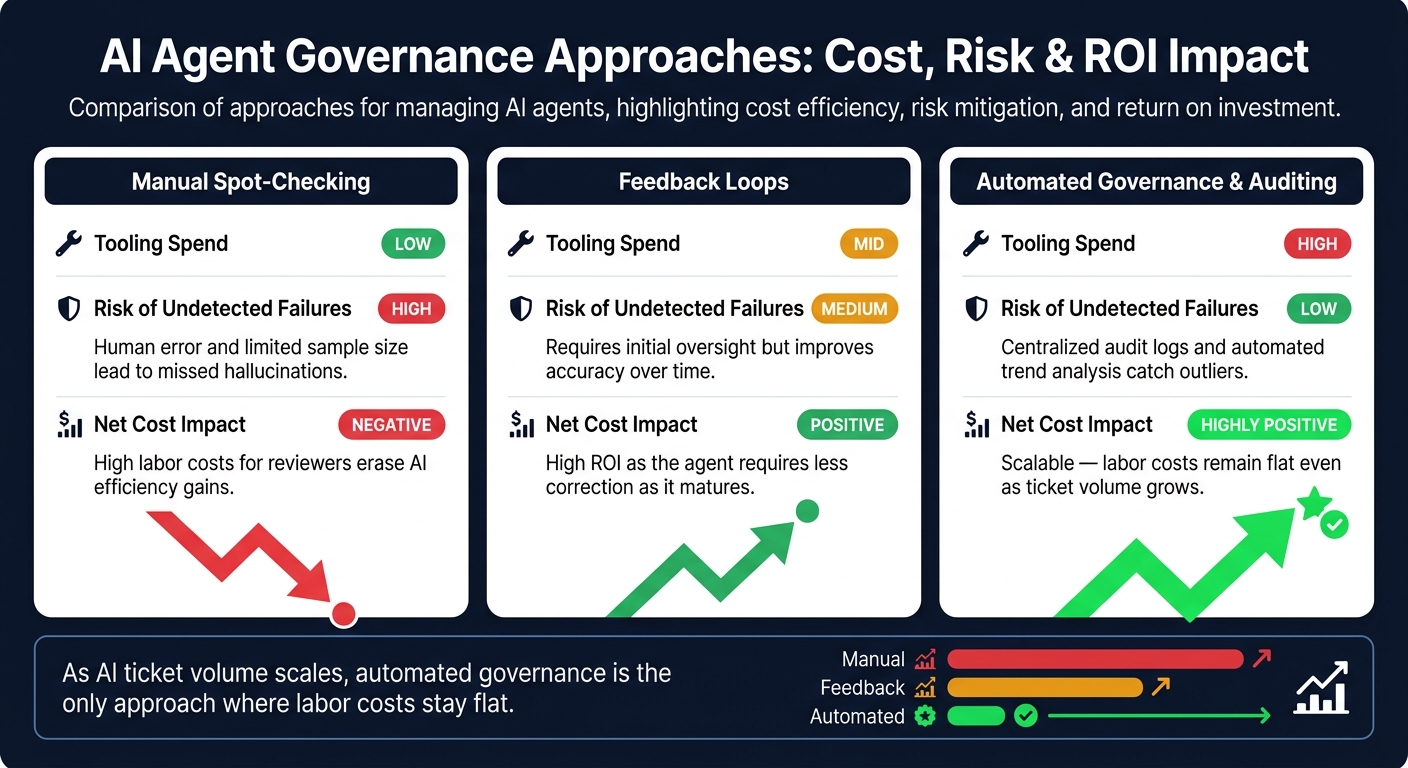
AI Agent Governance: Manual vs. Automated Monitoring Cost & Risk Breakdown
As AI usage grows, monitoring, access control, and compliance turn into steady operating costs. In plain English: governance spend grows with usage, not just support ticket volume.
What Teams Need to Monitor as AI Volume Increases
The day-to-day work comes down to keeping knowledge up to date, logging corrections, and keeping an audit trail for every answer. And as agents spread across workspaces, access limits need to stay tight.
If source content goes stale, the agent can give wrong answers until that source gets refreshed. Worse, the same mistake can show up again and again across chats if nobody spots it early. That puts one choice front and center: do you keep oversight manual, or do you automate it? The table below shows how each path stacks up on cost, risk, and 12-month impact [5].
| Approach | Tooling Spend | Risk of Undetected Failures | Net Cost Impact Over 12 Months |
|---|---|---|---|
| Manual Spot-Checking | Low | High: Human error and limited sample size lead to missed hallucinations | Negative: High labor costs for reviewers erase AI efficiency gains |
| Feedback Loops | Mid | Medium: Requires initial oversight but improves accuracy over time | Positive: High ROI as the agent requires less correction as it matures |
| Automated Governance & Auditing | High | Low: Centralized audit logs and automated trend analysis catch outliers | Highly Positive: Scalable; labor costs remain flat even as ticket volume grows |
How to Build Guardrails Without Adding Friction
The goal isn't more process. It's faster detection. Good guardrails cut review work instead of piling more onto the team.
Role-based access controls limit which people can see certain conversations. That helps protect sensitive data without forcing someone to manually watch everything. Workspace separation also matters. It keeps agents tied to the knowledge and teams that match their job, which lowers cross-workspace leakage and trims troubleshooting time when issues come up [3][4].
For higher-risk flows - billing questions, account changes, and security-related requests - human-in-the-loop checkpoints are usually worth the extra step. This is one of those cases where a little friction up front can save a mess later. It also helps to start correction loops early, when the biggest gains still sit on the table [5].
Converso supports granular access controls across workspaces and inboxes, a central audit log for all conversations, and active/inactive knowledge-source toggles so teams can disable outdated or non-compliant content without deleting it [5]. For critical answers like pricing and returns, use approved FAQ pairs [5].
With governance under control, the next issue is protecting ROI as volume keeps climbing.
Conclusion: How to Scale AI Agents Without Letting Hidden Costs Erase the ROI
The costs that chip away at AI support ROI tend to show up in the same order. Spend goes up, workflows spread out, knowledge starts to drift, handoffs drop context, and governance gets heavier as volume grows. The answer isn't using fewer agents. It's having tighter control over how they work.
Teams that keep these costs in check usually do three things well. They keep knowledge narrowly scoped, centralize work in shared inboxes and workspaces, and build human handoff into the workflow from day one.
That’s why handoff design matters just as much as automation itself. Converso preserves conversation history, customer intent, and AI reasoning at escalation, so human teams can pick up the same case without making the customer repeat themselves.
Converso supports this setup with scoped workspace knowledge, a shared omnichannel inbox, and in-context handoff. That helps teams spot hidden costs before they snowball and wipe out the gains from automation.
FAQs
How should I measure AI agent ROI?
Measure AI agent ROI by weighing total costs against day-to-day gains. Don’t stop at setup costs. You also need to track savings from routine inquiries the agent handles on its own and the labor hours your team no longer spends on repeat tasks.
A few metrics matter most here:
- Resolution rates
- Response time
- Agent productivity
- Ongoing costs
Those ongoing costs can add up, so it helps to spell them out early:
- Fine-tuning: $5,000 to $20,000 per year
- Cloud hosting and monitoring: $1,500 to $8,000 per month
- Data security compliance: $3,000 to $15,000 annually
When should an AI agent hand off to a human?
An AI agent should pass the conversation to a human when the issue goes beyond what it can handle, or when the moment calls for nuance, empathy, or careful judgment.
Some of the most common handoff triggers are:
- Customer frustration or urgency
- Repeated questions
- Complex technical issues
- High-value interactions
- Clear buying intent
Converso helps make that handoff smooth by keeping the full conversation history and customer metadata in place. That means customers don’t have to repeat themselves, which makes the whole experience feel a lot less frustrating.
How can I scale AI agents without agent sprawl?
Centralize operations in one platform with tight control. With Converso, you can split products, departments, or customer groups into multiple workspaces and inboxes, while keeping each agent tied to a clear knowledge scope.
That means you don’t need duplicate agents for every team or channel. Instead, you can keep conversation history, metadata, and AI context in one place across channels. As your volume grows, automation can scale with it, and handoffs to human agents can happen smoothly when needed.


.svg)
.svg)
.svg)
.svg)